Purpose-built for oilfield service companies
Compliance That Never Breaks Down
Certificate Manager replaces shared drives, spreadsheets and bespoke databases with one certificate library that knows what every asset needs, what has expired, and how each client wants their job pack delivered.
Windows desktop application. Runs entirely on your own infrastructure.
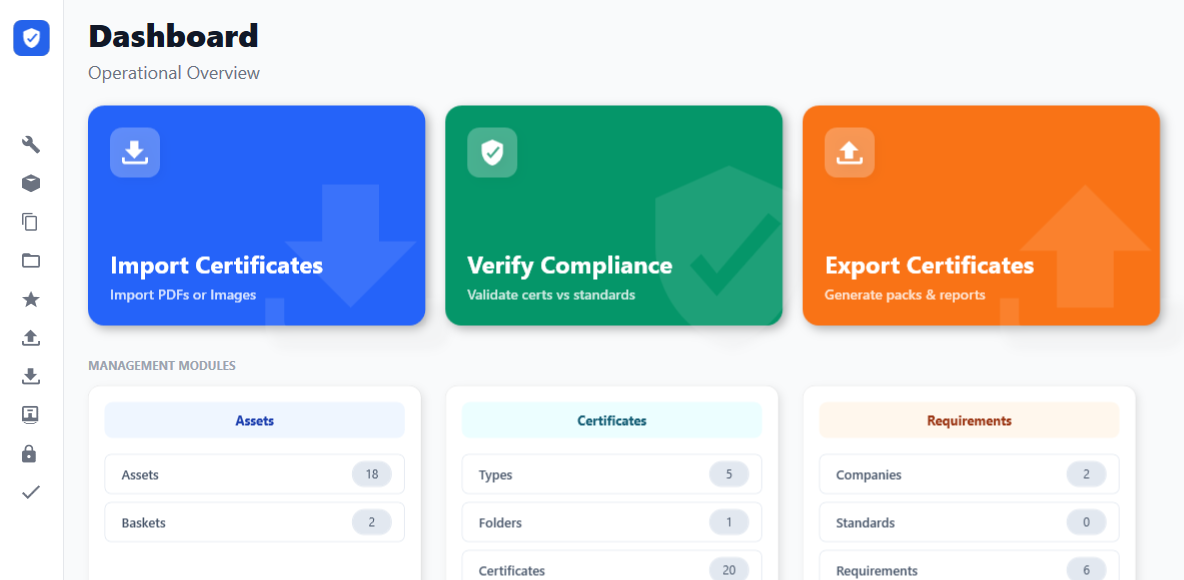
See it in action
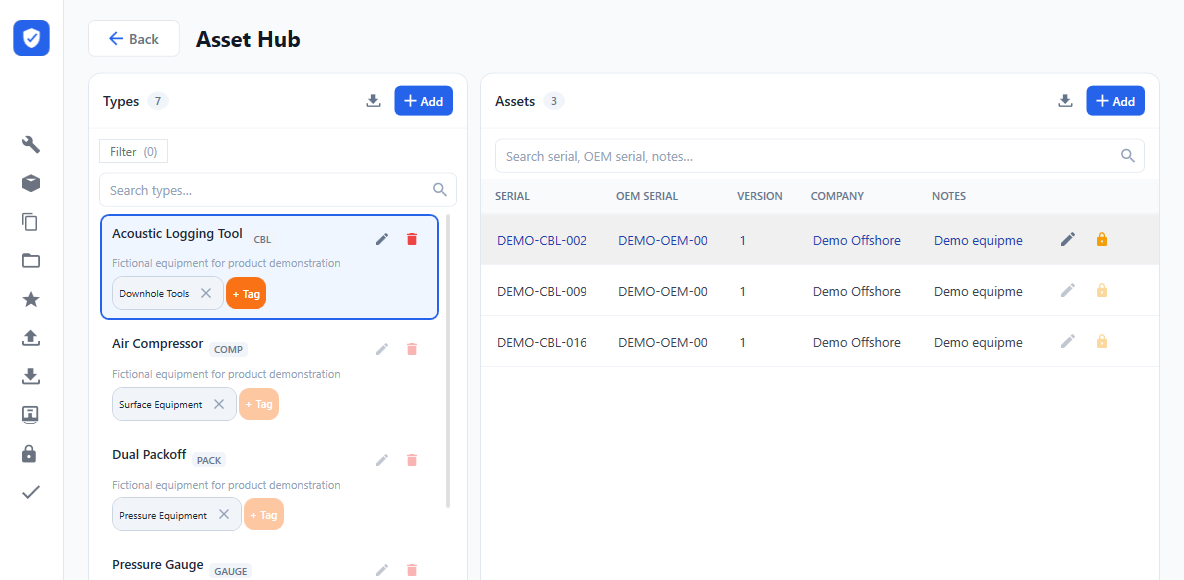
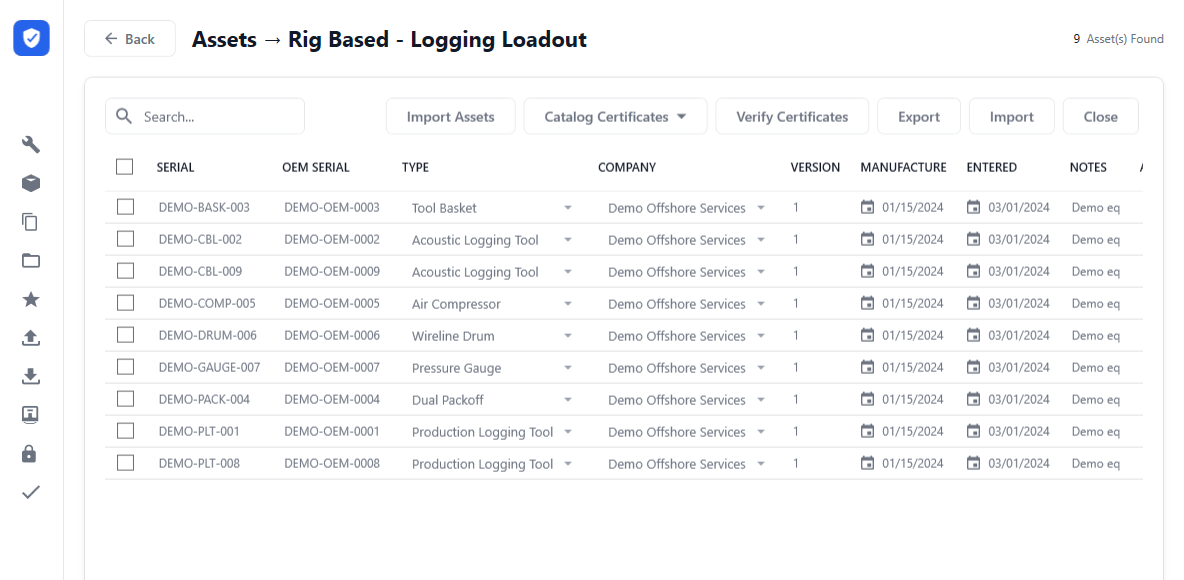
Your library. Your assets. Your loadout.
Real screens from the Windows application, using fictional demo data. Select a screenshot to view it at full size.
The problem
Certification admin takes time away from operations
Most oilfield service companies manage certification with tools that were never designed for it. The cost does not appear on any line of the budget, because it is buried in people's time.
What companies rely on today
- Shared drives that become dumping grounds
- Spreadsheets only one person truly understands
- Bespoke databases that only their author understands
- Last-minute folder searches before a mobilisation
Where it fails operationally
- Job packs rejected by clients for wrong format or missing documents
- Expired certificates found on the rig, when it is far too late to fix
- Incorrect naming conventions that fail client document control
- Delayed loadouts while paperwork is chased
- Audit findings and downtime that follow on from all of the above
One system. One library. Every pack verified before it leaves.
Why current systems fail
Most of this can be built. The question is who maintains it.
SharePoint can be made to track expiry dates. A well-built in-house database can do everything on this page. Neither claim is in dispute, and any vendor telling you otherwise is insulting your judgement. The real question is different: does the tool do this the day you start using it, or does someone at your company have to design it, build it, and still be there in three years to keep it working?
| System | Expiry logic | Policy engine | One-click export | Audit trail | Asset linking |
|---|---|---|---|---|---|
| Shared drives | ✗ | ✗ | ✗ | ✗ | ✗ |
| Excel sheets | ◦ | ✗ | ✗ | ✗ | ◦ |
| SharePoint | ◦ | ◦ | ◦ | ✓ | ◦ |
| In-house database | ◦ | ◦ | ◦ | ◦ | ◦ |
| Certificate Manager | ✓ | ✓ | ✓ | ✓ | ✓ |
Works out of the box Achievable, but you design, build and maintain it Not realistically achievable
Read the middle column honestly. Those circles are not weaknesses in Microsoft's products or in your developer's work. They mean the capability is reachable, and that reaching it is a project: someone specifies the expiry rules, builds the flows, tests them against a real client's document requirements, and owns the result every time a client changes their standard or a new certificate type appears. That project is the actual cost being compared here, and it does not end at go-live.
Shared drives
A folder tree holds files and knows nothing about them. There is no date it can act on and no way to prove, later, what was valid on the day you shipped.
Excel sheets
Date formulas genuinely work, and most companies get surprisingly far on one. It breaks at the join: the sheet cannot hold the certificates themselves, so the register and the documents drift apart.
SharePoint
Strong storage, real permissions and a genuine audit trail. Lists, lookup columns and Power Automate can model expiry and policy — that is a build project with an owner, not a setting you switch on.
In-house database
Can do all of it, and when well built it fits your process better than any product. The risk is not capability, it is continuity: one person usually holds the design, and the cost lands the day they move on.
The solution
Centralised. Standardised. Verified.
A policy-driven system that keeps every tool, certificate and job pack accountable, so nothing leaves the yard unverified.
One organised library
Every certificate in one register with its type, issue date, expiry frequency and the asset it belongs to. No more hunting through folders or email chains.
Instant expiry checks
Scan every asset or a single basket and see immediately what is valid, what is expiring and what is missing.
Client policy engine
Verify against your own company standard or a specific client's rules, including shorter validity periods where a client demands them. You define each policy once, from the requirements that client actually gives you, and reuse it on every job.
One-click rig pack export
Build a complete, correctly named, client-ready pack with manifest and compliance report in a single action.
Worked example
From manual searches to a verified pack
An illustrative mobilisation to an operator with a strict document policy and no tolerance for expired certification. The counts below describe this example, not a measured performance benchmark.
- Searching drives for the right files
- Renaming documents by hand
- Checking 106 expiry dates one by one
- Rebuilding the Excel manifest
- Last-minute panic fixes
- Select the job basket
- Apply the client policy
- Click export
- Complete pack ready, 160 files
Start with a current certificate library. Export and verification depend on certificates already being scanned, attached and current in the system. We bulk import assets and asset types from your existing Excel registers during onboarding. Keeping the library current remains an ongoing task. Preparation time depends on your records, document requirements and equipment.
Capability
What the software actually does
Certificate register & standards
- Library of certificate types with default expiry frequencies
- Multi-standard certificate support
- Certificate to asset and certificate to company linking
- Built-in PDF viewer and file fingerprinting
- Bulk import for large onboarding
Asset database & categories
- Clear hierarchy: categories, types, assets
- Serial numbers, OEM numbers, notes and history
- Archive retired assets without losing history
- Baskets for loadouts, wells, rigs or Loadout Requests
- Bulk import from Excel for rapid population
Verification & compliance
- Scan all assets or selected baskets
- Identify missing, expired or invalid certificates
- Compare against company or per-client policies
- Override validity periods where a policy requires it
- Generate compliance reports on demand
Export & document generation
- Certificate packs for a basket or a full rig
- Manifests, compliance reports and supporting files
- Client-specific file naming with length control
- Export to PDF, Excel or CSV
- Batch rename and move files to meet conventions
Security & administration
- Four permission levels: Reader, Maintainer, Manager, Administrator
- User management and password resets
- Audit logging and two-stage approvals
- Automatic schema migration on upgrade
- Scheduled and pre-upgrade database backups
On the roadmap
- Certificate template generation
- JSON metadata models
- UN/CEFACT Verifiable Credentials support
- Full digital certificate issuance and validation
Technical direction
Built for today, engineered for tomorrow
You buy a working product now, on a roadmap that does not require you to wait.
Standalone Windows
Windows desktop application with a local SQL Server Express database. Fast, reliable and fully functional without a network.
- No cloud dependency
- Full offline capability
- Local data sovereignty
- Role-based permissions and audit logging
- Instant performance
Multi-user
Client/server architecture with a central SQL database for team collaboration.
- Multiple simultaneous users
- Central shared database
- Active Directory support
- Extended audit trail
Cloud platform
Cloud-enabled with remote access and digital certificates.
- Global access capability
- Digital certificate issuing
- Offline replicas
Return on investment
Assess the value using your own figures
Compare the cost of your current certification process with the cost of the software, setup and ongoing library maintenance. Use figures from your operation to assess potential savings.
Worked example: use your own costs. Take the fully loaded hourly cost of whoever currently owns certification and multiply it by the hours they spend on it over a period you choose. Estimate how much of that work would remain with Certificate Manager, including library maintenance. Compare the potential saving with the software, setup and support costs over the same period. If delayed mobilisations are a cost for your business, include them separately using your own records and day rate. We will work through this calculation with your actual figures as part of the demo.
Why Certificate Manager
Built for the realities of oilfield operations
Certificate Manager was designed from the ground up for oilfield service companies that cannot afford downtime, delays or compliance failures.
Unlike generic document management tools, it models the workflow you actually run: client policies, rig packs, asset certification and the pressure of a last-minute job mobilisation.
“We built Certificate Manager because we saw oilfield companies struggling with tools that were never designed for their reality. No shortcuts, no generic solutions, just a system that handles the actual work.”
Ewan Makepeace, QAQC Specialist
Built for critical operations
- Desktop reliability for remote sites where connectivity cannot be assumed
- Works offline at the exact moment you need it most
- Your data stays on your infrastructure, which shortens IT approval
- Protected against loss with scheduled and pre-upgrade backups, stored outside the application folder
- Designed for high-pressure environments and long-term support
When compliance failures mean lost revenue, delayed jobs and client penalties, you need software that understands the stakes.
Pricing
One product, one price
There is one thing to buy today, and it is the whole product as it exists now. No tiers withholding features you would expect to have, and no upgrade you need in order to make it useful.
- Complete certificate and asset register
- Automatic expiry logic with configurable frequencies
- Client policy verification, including overridden validity periods
- One-click job pack export with manifests and compliance reports
- Client-specific file naming and batch rename
- Four permission levels with user management
- Audit logging and two-stage approvals
- Bulk import from your existing Excel registers
- Scheduled and pre-upgrade database backups
- Email support
Launch programme
Early adopter programme
Certificate Manager is new, and the first companies to run it in anger are doing us a favour: their operations shape what gets built next. In exchange early adopters get direct access to the person who built it and a say in the roadmap.
Ask about the launch programme when you get in touch.
What is coming, and what it will cost
The current release is a standalone Windows application, and it already includes the policy engine, the audit trail and role-based permissions. Those are not held back for a higher tier, because they are how the product works.
The next release adds simultaneous multi-user access over a central database. That is a genuinely different capability rather than a feature flag, so it will be priced when it ships. Buying now does not lock you out of it, and we will not quote you a number today that we cannot stand behind.
Setup & onboarding
- Setup and installation Fixed quote
- Data migration from existing registers Fixed quote
Optional add-ons
- Client policy configuration Fixed quote
- Priority support $2,000 / year
Your total, agreed before work starts. The Standard licence is $8,000 per computer per year. Setup, data migration and any optional policy configuration are quoted separately at a fixed price after reviewing your requirements and existing registers.
All prices are in US dollars. Contact us for a written quote with the full total, licence duration and any ongoing fees.
Get started
Get control of your certification
Book a demo and see how Certificate Manager supports your certification workflow and stops incomplete packs leaving the yard.
- Live demonstration of the working system
- A custom implementation plan for your operation
- Return-on-investment analysis using your own figures
- Straight answers to your questions
Implementation timeline
- Consultation callUnderstand your assets, clients and current registers
- Proposal and pricingFixed quote against your actual scope
- System installationInstall on your infrastructure
- Data migration and setupImport registers and configure requirements
- Team trainingTrain your team on its workflows
- Go live with full supportHandover with support in place
We agree the rollout schedule after reviewing your data, infrastructure and training needs.